(This page is a work-in-progress.)
IBM Verse Email Filters
One of the primary benefits of Verse on the web is to be able to quickly filter your email to find the messages you want to focus on. Competitive products, such as Outlook and Apple iOS Mail, also have this feature.
User Stories
Since we had been thinking about this feature for awhile, I started with writing down the use cases. These are directly from the specification document (a Keynote).
Writing things down is one of the most powerful things a designer can do for an organization. Often requirements are vague and the user value is unknown. Writing user stories prior to design explorations can save a lot of time by aligning stakeholders on the goals and benefits.
A good user story has 3 components – the user, what they are doing (not how), and why they want to do this.
User Stories:
- The user can turn on filters in a single tap so they can work with a subset of their messages in a folder. The default filter is unread messages.
- The user can select one or more filters so that they can change the default behavior.
- Available filters: Unread Only; High Priority Messages; Messages with Attachments; From people marked as important to me (VIP)
- Filters are cumulative. So you could set “Unread messages from important people that have attachments and marked high priority”
Design Problem
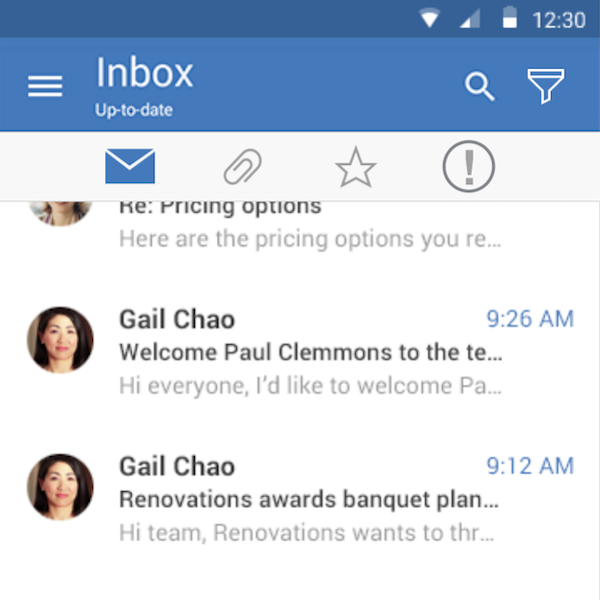
A prototype had copied the iOS filter bar at the bottom of the screen, but this didn’t work for Verse since there was already a tab bar at the bottom – this caused problems touching the right target area and also took up valuable screen real estate. Apple filters behaved differently from what Verse provided, so I put them at the top where they could scroll off the screen if they were not being used, but were ‘sticky’ to the top if one of them were in use.
Android, shown to the right, was different because each app was separate, so there was room at the top for a filter icon to hide and show the filter bar.
I put together this quick Keynote prototype to show how the filters scrolled or stayed on screen, depending on whether they were active or not.
Interaction Flow for Wiki Feature
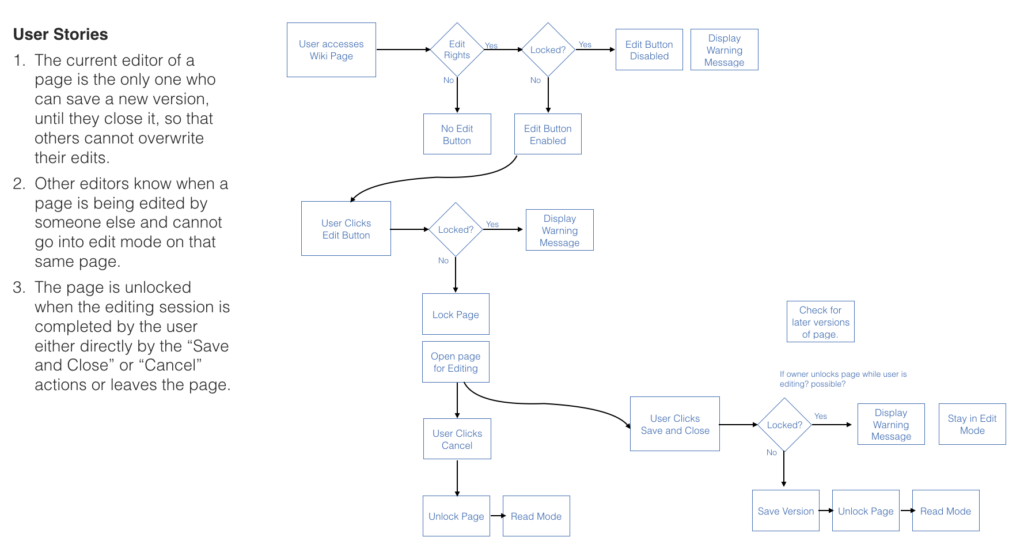
One of the most requested features for Connections Wikis is the ability to lock a page for editing so that others can overwrite your changes. I researched and created the user stories, framing the problem in terms of the user goal and benefit. While this is an enhancement to an existing app, there are quite a few nuances to making it work seamlessly. After clarifying the user stories, I made the flowchart below to help explain the options in different scenarios. For complex interactions, this is often the best way to communicate your intentions to the developer.